

Video Editing Resources for Faculty
Purpose
This page provides faculty with information on video editing and screen recording tools they can use to create instructional videos, lecture recordings, software demonstrations, and other e-learning materials.
Software Support
ITS provides access and installation support for the software listed below, including assistance with technical issues such as installation, licensing, and access. The Learning Technology Team within CAE provides links to training, instructional design support, and guidance on using the tools.
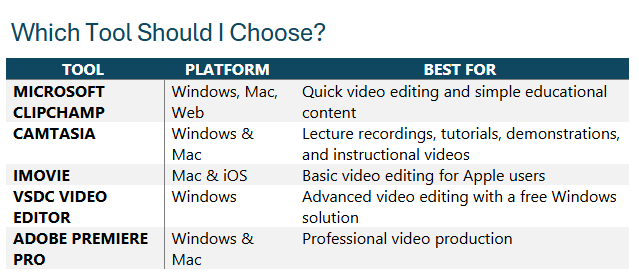
Note: For most lecture recordings, tutorials, demonstrations, and online learning content, faculty are encouraged to use Microsoft Clipchamp. Clipchamp offers the core features needed for most instructional video projects, along with easier access and streamlined hosting and sharing. Use Camtasia when you need a more comprehensive editing suite.
Tools Available to All Faculty
Microsoft Clipchamp
Best for: Quick video editing and simple content creation
Microsoft Clipchamp is a video editing tool that allows you to create, edit, and share videos. It includes templates, screen recording, music, captions, video trimming, and slideshow creation.
Windows 11 users can access Clipchamp through the desktop application by searching for Clipchamp from the Start Menu.
Learn More
- Brightspace Resource Page – Working with Multimedia. Need to be logged into Brightspace to access
Camtasia
Best for: Instructional videos, lecture recordings, and software demonstrations
Camtasia is an all-in-one screen recording and video editing application designed specifically for creating educational content. Faculty can record their screen, webcam, and audio, then enhance recordings with captions, annotations, callouts, transitions, zoom effects, and interactive elements.
Camtasia is particularly well suited for:
- Recording lectures and presentations
- Creating software demonstrations
- Developing online learning materials
- Producing step-by-step tutorials
- Adding captions and accessibility features
- Creating engaging instructional videos
Learn More
iMovie (Mac & iOS)
Best for: Basic video editing on Apple devices
iMovie is Apple’s free video editing software for macOS and iOS. Users can create and edit videos using their own video clips, photos, titles, transitions, music, and effects.
Learn More
Adobe Premiere Pro – Additional Licensing required
Best for: Professional video production and advanced editing
Adobe Premiere Pro is Adobe’s professional video editing platform used for film, television, and online content creation. It includes advanced editing, audio enhancement, visual effects, motion graphics integration, and other professional-grade production tools.
Licensing Information
Adobe Premiere Pro licenses are primarily reserved for faculty teaching in programs where students learn and use Adobe creative applications as part of their curriculum.
A very limited number of additional licenses may be available for other faculty members based on demonstrated academic or business need, available licensing, and approval.
Faculty interested in obtaining a license should submit an ITS Ticket to discuss their requirements and determine whether a license is available and appropriate for their use case.
Learn More